 easywall
GitHub ↗
easywall
GitHub ↗
Architecture
Two processes. The one exposed to the network has no way to touch the firewall.


Who may do what
easywall-web |
easywall-core |
|
|---|---|---|
| Runs as | unprivileged user | root, in the easywall group, with the capability set cut down to CAP_NET_ADMIN |
| Listens on | HTTPS, port 12227 | Unix socket only |
| Can reach nftables | no | yes, via netlink |
| Can run a shell | no | nft only: --check --file - to validate a custom rule, -f - to apply one |
| Holds | sessions, templates | rule state, acceptance timer |
A flaw in form parsing or template rendering cannot reach the kernel, because the process holding that flaw has no kernel access to misuse. Reaching the firewall additionally requires a JSON command the typed protocol accepts and the core’s validation permits.
Why it is built this way. The original easywall — Python, Flask,
iptablesviasubprocess— ran everything as one root process and passed user strings as command-line arguments. A web-layer bug was a firewall bug, and arguments could be injected. It was archived in 2022 after a CVE. Both root causes are gone here: the privileges are in a different process, and every typed rule reaches the kernel as a Go struct rather than a command line. Custom rules are the one string that still meetsnft, and what keeps that safe is written out under Security.
Three rule sets


Editing never touches the kernel. Saving writes to Staged; only Apply promotes it to Current, and Backup is what comes back if you do not confirm.
Applying, and the way back
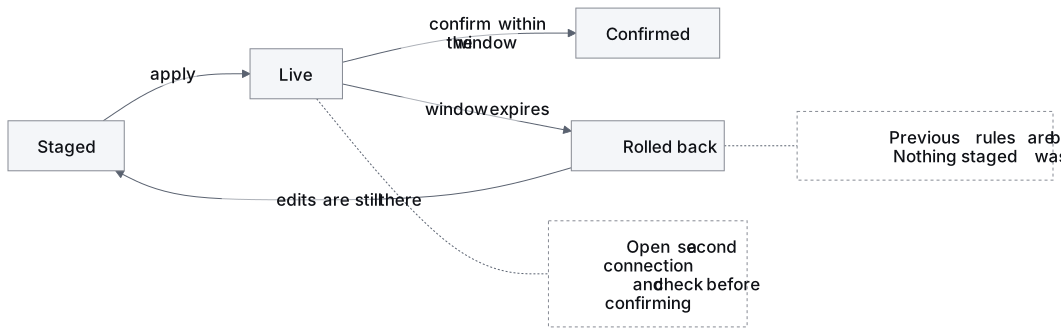
Applying is reversible by doing nothing. Not confirming — whether by choice or because you can no longer reach the page — restores the previous set.
| Window | 120 seconds by default, 10 to 3600 |
| Where the timer lives | the core daemon. Closing the tab or restarting easywall-web confirms nothing |
| Stopping the core mid-window | counts as not confirming: the rules roll back before it exits |
| The same idea as | commit confirmed on a Cisco router, or the at now + 5 minutes; iptables -F experienced operators type before a risky change — here it is the default rather than a habit |
Step by step: Applying rules.
The socket protocol
Twenty-five message kinds, declared as Go structs on both sides. Adding an operation means adding a constant to both ends.
One exception, worth knowing: SaveRulesPayload.Rules is an interface{} that the
core re-encodes and decodes into the type named by rule_type. An unknown
rule_type is rejected. The decoded rules are validated before they are stored.
The field itself is not typed at the protocol level — this page once claimed the
whole protocol was.
| Command | Purpose |
|---|---|
GET_RULES · SAVE_RULES |
read all three sets · write Staged |
APPLY_RULES · ACCEPT |
promote Staged and start the timer · confirm |
CANCEL_ACCEPTANCE |
end the open window now, without waiting out the timeout |
GET_OPTIONS · SAVE_OPTIONS |
protection modules |
GET_SETTINGS · SAVE_SETTINGS |
IPv6 and Docker |
GET_SYSTEM · SAVE_SYSTEM |
acceptance window |
GET_STATUS · GET_LOG |
dashboard · last 200 audit entries |
GET_PACKET_LOG |
what the firewall refused — decoded packets from easywall’s NFLOG group, filtered, newest first |
EXPORT_RULES · IMPORT_RULES |
backup and restore as JSON |
VALIDATE_CUSTOM |
nft --check for the live editor |
GET_APPLIED_CONFIG |
the options and network settings that went into the kernel with the rules that are in it |
GET_USAGE |
what each port rule has carried, keyed by rule id, and when the figures were read |
GET_HEALTH |
whether the firewall is doing what it says — three facts evaluated in order, plus the last self-test’s identity |
PANIC · RESUME |
tear the table down and record it · end that and restore |
LOG_EVENT |
one of thirteen login events, from a fixed enum, for the audit log |
UPDATE_FEED |
a new version of one feed, fetched by the web process; the core re-checks every entry before it stores or loads any |
GET_FEEDS |
per feed: entry counts, when it changed and was checked, packets dropped — never the entries |
A message is at most 8 MiB each way. A longer request is answered request too large.
Full list: internal/shared/protocol.go.
What this does and does not protect you from
| Defends against | How |
|---|---|
| Web-layer vulnerabilities | the web process has no kernel access |
Argument injection into nft |
the apply path builds structs, not a command line |
| CSRF | Origin and Sec-Fetch-Site checked on every unsafe method |
| Locking yourself out | the acceptance window reverts on its own |
| Does not defend against | Why |
|---|---|
| A compromised root account | root owns the core |
| A kernel nftables vulnerability | below easywall entirely |
| A legitimate admin making a bad rule | the audit log records it, nothing prevents it |
Next: Applying rules · Configuration · Security · How rules are ordered