 easywall
GitHub ↗
easywall
GitHub ↗
Firewall Filters
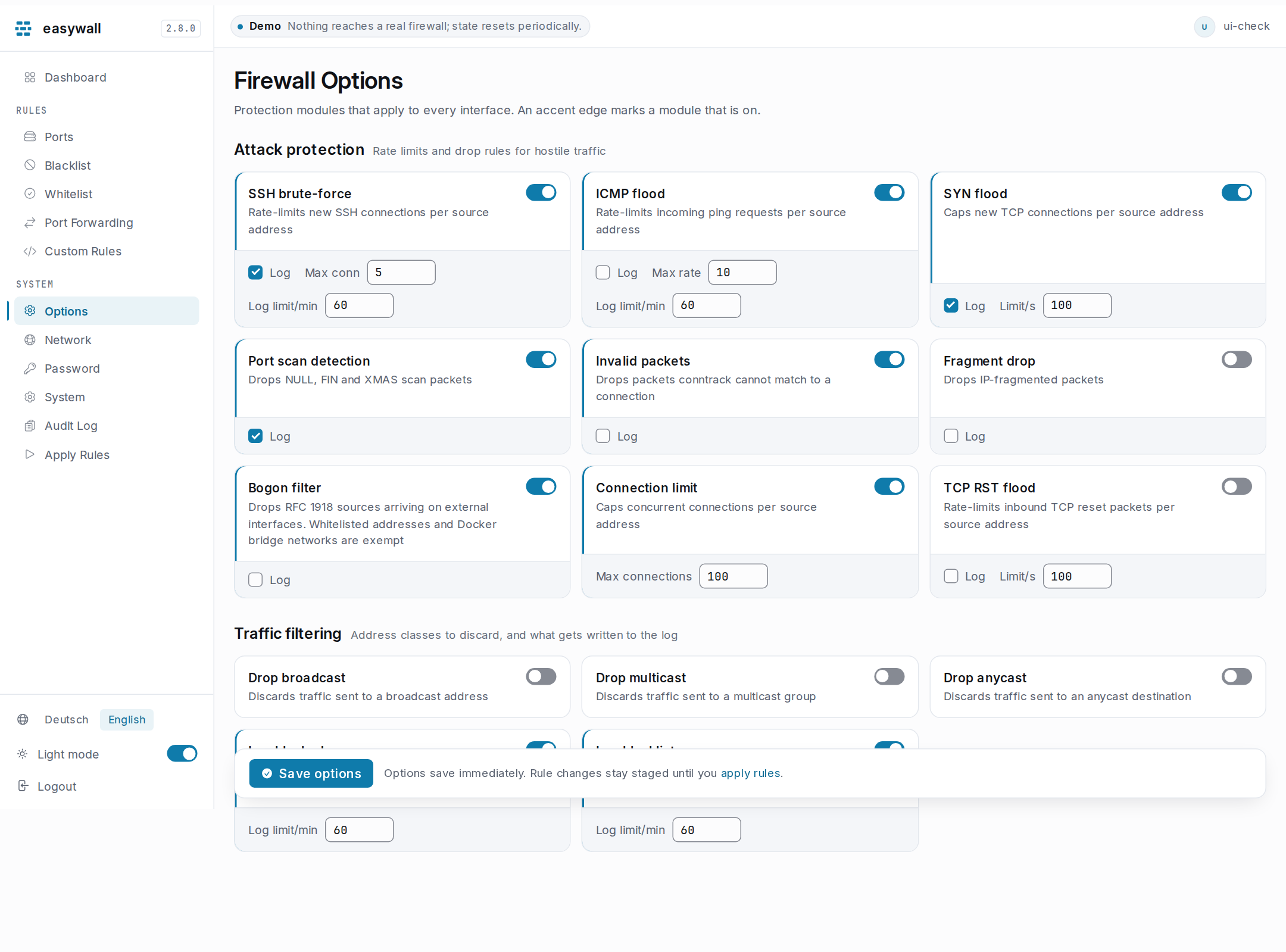
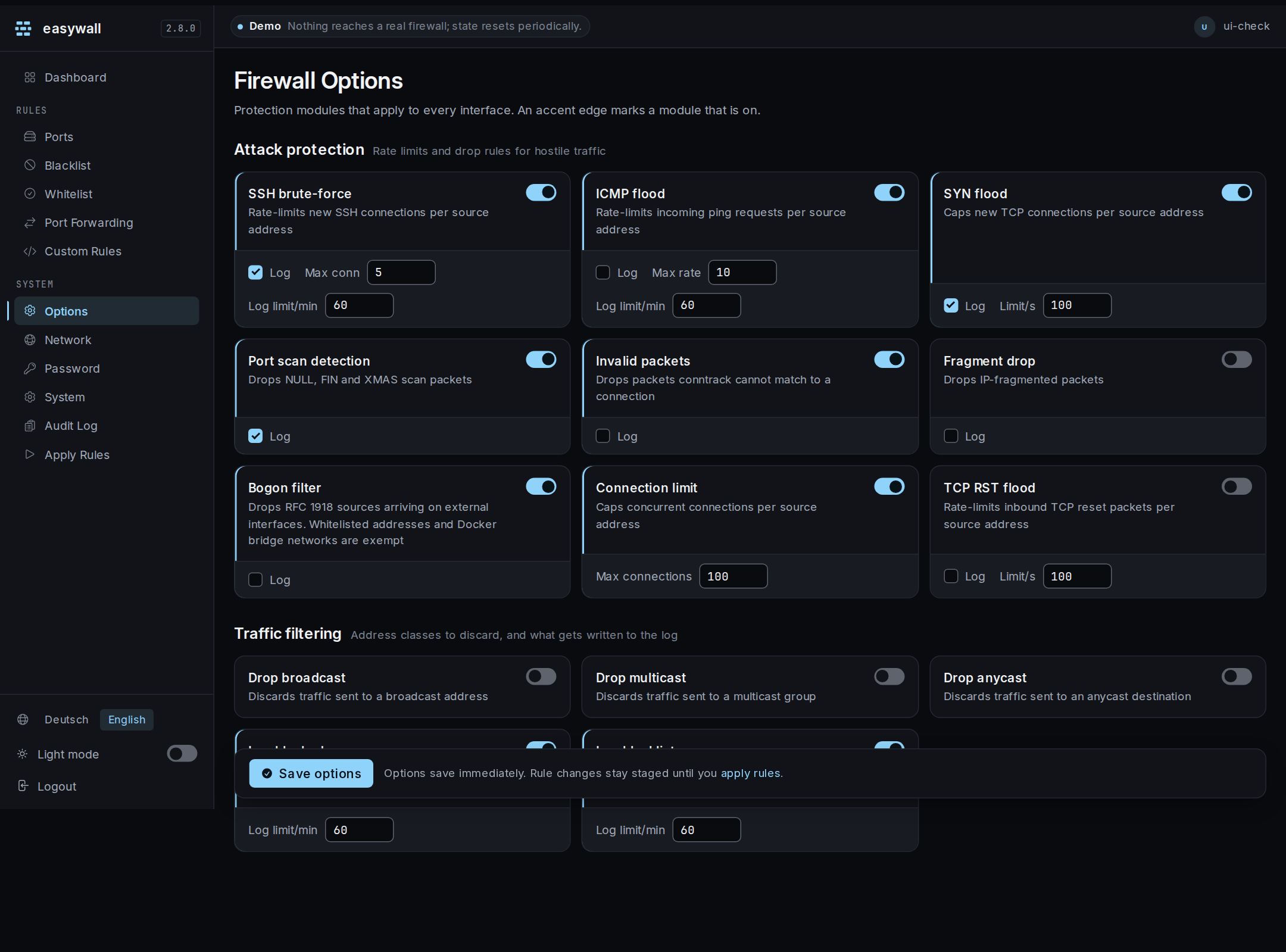
Optional modules that harden the host beyond opening and closing ports. All of them
are native nftables rules in table inet easywall — no subprocess, nothing to inject
into.
An option is saved to the daemon’s configuration immediately and reaches the
kernel at the next apply. Since
2.10 that counts as a pending change: the dashboard’s Unapplied changes chip
includes it and the apply screen lists it by its key, drop_fragments off → on.
Which to turn on
The question most people arrive with. Details for each module are below.
| Host | Turn on | Leave off |
|---|---|---|
| Public server, static address | Everything under Attack protection but fragment drop, plus the bogon filter | Fragment drop — it breaks large DNS answers, see below |
| Behind NAT, or on a LAN | SSH brute-force, SYN flood, port scan, invalid packets. The bogon filter too, once your own network is allowlisted | Broadcast/multicast/anycast |
| Container host | The defaults. The bogon filter is safe with Docker coexistence on — bridge networks are exempt | — |
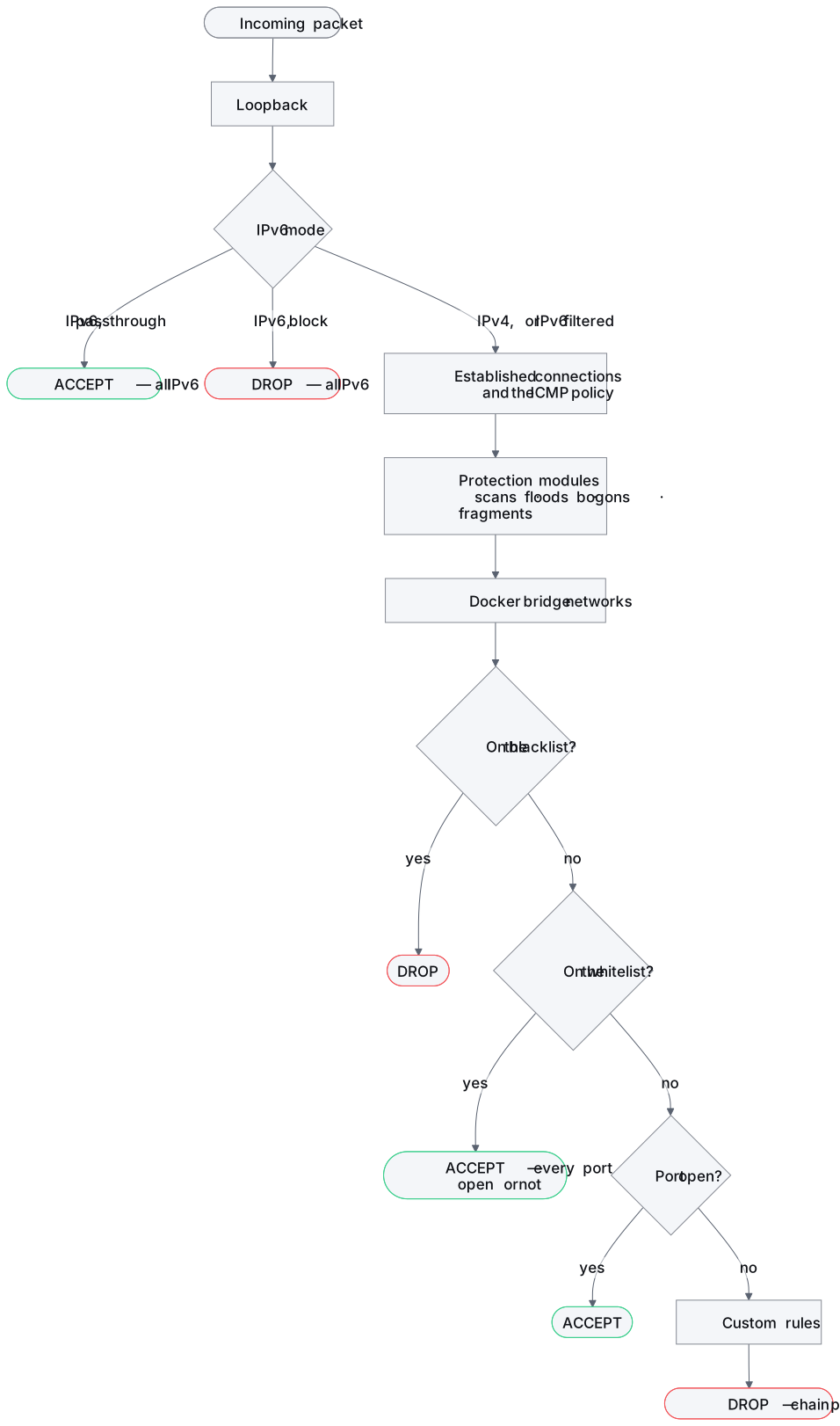
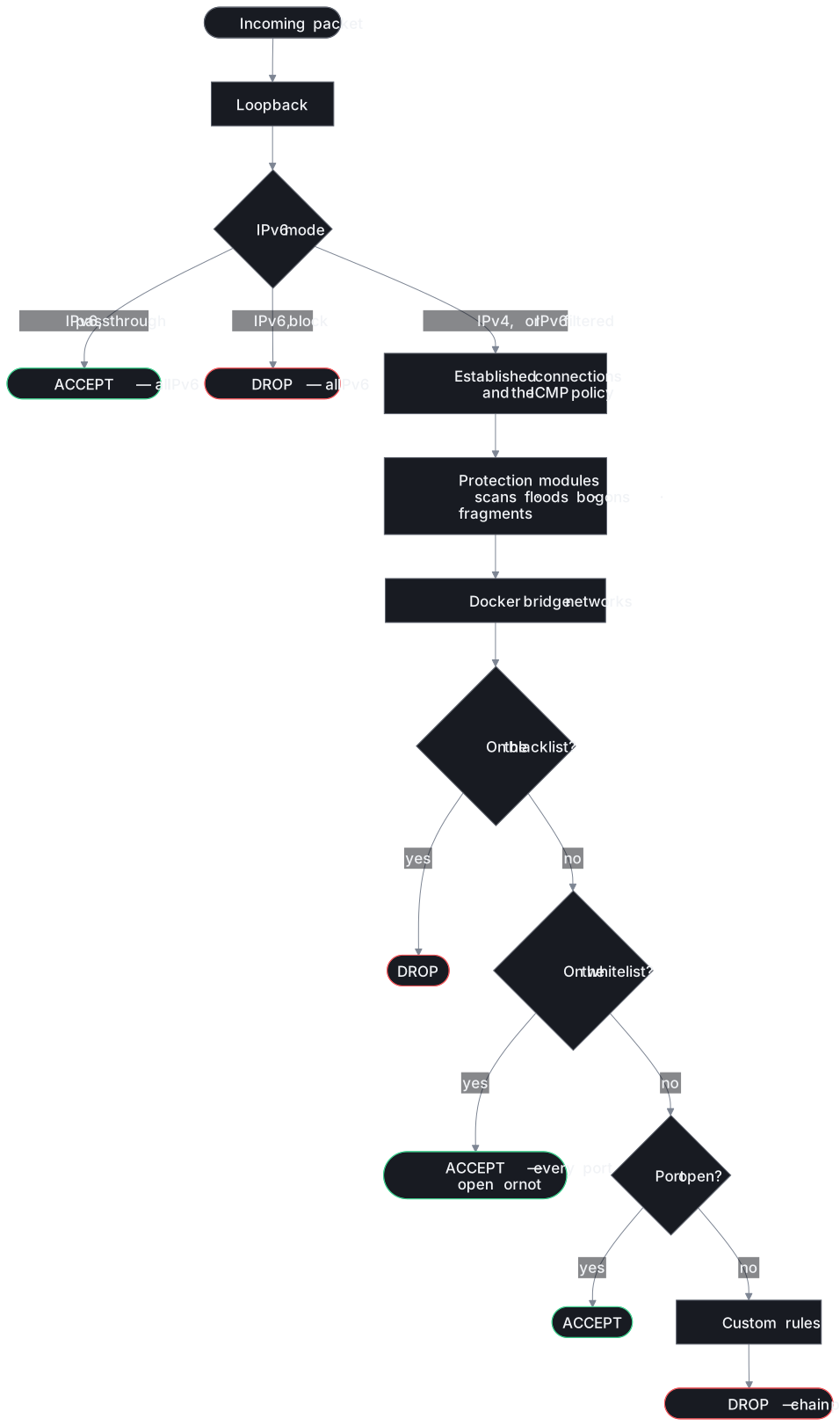
Where the modules sit
Before the blocklist, before the allowlist, before any port is considered. A module that drops a packet drops it whatever else you have allowed.
Two things come earlier still: loopback, always, and the IPv6
mode — set to passthrough or
block, IPv6 is decided before any module sees it.
Two modules come right after the IPv6 mode, ahead of return traffic: ICMP flood and TCP RST flood. To conntrack, every ping after a source’s first and every reset for a live connection is return traffic, and the accept would let them through unmetered. Fragment drop runs before all of it, in a chain of its own — see what it breaks.
Always on
Compiled into every rule set. There is no switch for these.
| Rule | nftables | Why |
|---|---|---|
| Default DROP | policy drop on input |
Deny by default |
| Loopback | iif lo accept |
Local processes must reach each other |
| Return traffic | ct state {related, established} accept |
Replies to what you started, and every ICMP error about it — unreachable, fragmentation needed, time exceeded |
| ICMPv6 discovery | types 133–136, when enabled | Neighbour discovery and address autoconfiguration — see network settings |
No other ICMP type is accepted on its own, apart from pings. An echo reply is return traffic only when this host sent the echo, and an error only when it is about a connection conntrack tracks. An unsolicited reply, an error about nothing and a timestamp request meet the policy drop.
Answering pings
| Switch — default | Accepts | Behind |
|---|---|---|
icmp_allow_echo_request — on |
ICMP type 8 and ICMPv6 type 128 — the latter when IPv6 is set to filter | ICMP flood, which drops a source over its rate first; the blocklist and the feeds, which refuse a source before any ping is answered |
Off, this host answers no ping — except over IPv6 under ipv6.mode = "passthrough", which accepts all IPv6 before any rule. Its own pings still get their replies, and path-MTU discovery and traceroute still work: those are return traffic.
Only your monitoring may ping: switch it off and put the monitoring address on the allowlist. The allowlist accepts everything from that address — every port, not only ping.
The three chains
Everything above is the input chain — traffic addressed to this host. easywall
creates two more, and what they do has consequences worth knowing.
| Chain | Policy | What reaches it |
|---|---|---|
input |
drop | Traffic addressed to this host. Everything on this page. |
output |
accept | Traffic this host sends. easywall does not filter it. |
forward |
drop by default | Traffic this host would route — between two interfaces, out of a container, into a published container port. Governed by [routing] |
Closed is not the same as unfiltered. A base chain whose rules give no verdict falls through to its policy. An empty
forwardchain withpolicy dropdestroys every routed packet at that hook. That includes packets another table has already accepted. The drop is final: a forward chain of your own cannot overrule it, and custom rules go intoinput. Costs nothing on a plain server; stopped every Docker container dead until 2.5.0.
Two things cross that chain:
- The Docker networks you have allowed,
whatever
routing.modesays. Switching coexistence on is already the statement that this host carries container traffic. - Whatever
[routing]names. Its three positions — route nothing, route these networks, leave routed traffic alone — are on the Network page and in configuration.
Attack protection
| Module | Drops | Tuning | Default |
|---|---|---|---|
| SSH brute-force | New SSH connections from one source above its rate. Applies to ports marked SSH protection on the ports page, and to 22 if none is marked | ssh_brute_force_connection_limit — 5/min |
on |
| Answer pings | Nothing — it accepts ICMP type 8 and ICMPv6 type 128; what else ICMP gets | — | on |
| ICMP flood | Echo requests from one source above its rate — ICMP type 8 and ICMPv6 type 128 | icmp_flood_connection_limit — 10/s |
on |
| SYN flood | New TCP connections from one source above its rate | syn_flood_limit — 100/s |
on |
| Port scan detection | Seven impossible TCP flag combinations: NULL, FIN alone, SYN+FIN, RST+FIN, SYN+RST, XMAS and all-flags — none of which a real client sends | — | on |
| Invalid packets | Packets conntrack cannot match to a connection | — | on |
| Fragment drop | Fragmented IPv4 packets to this host, before reassembly — what it breaks | — | off |
| Bogon filter | Impossible IPv4 source addresses on a non-loopback interface | — | off |
| Connection limit | Simultaneous connections from one source above its cap | connection_limit_max — 100 |
off |
| TCP RST flood | Inbound RST packets from one source above its rate, for a live connection or none | tcp_rst_flood_limit — 100/s |
off |
Every rate is counted per source address — one kernel counter per address, in a set whose entries expire when that source goes quiet. A flood from one host cannot spend the budget that keeps you connected.
Not true before 2.5.0: four modules held a single counter for the whole machine, so five SSH attempts a minute from anywhere locked out the administrator too.
Every module runs before the allowlist, so it applies to an allowlisted address like any other. Only the bogon filter exempts one.
What fragment drop breaks
The kernel reassembles a fragmented packet before the input chain sees it. So this
module has a chain of its own, fragments, at the prerouting hook, ahead of the
reassembly. It drops IPv4 fragments addressed to this host. IPv6, loopback and traffic
the host routes are left alone. A port forward to this host’s address counts as
traffic to this host.
That breaks every reply too large for one packet. The one most hosts meet is a DNS
answer over UDP carrying DNSSEC, and
RFC 8900 asks operators not to
filter fragments to or from a DNS server. Until 2.22 the rule sat in input and
matched nothing.
The other is a tunnel. WireGuard runs over UDP, and when a path’s MTU is smaller than its packets, each one arrives in fragments and is dropped. A production host measured it in 2.23: 60 fragments from its own WireGuard peer within one second. If the tunnel is your way into the host, leave this off or lower the tunnel’s MTU.
What the bogon filter drops
A packet claiming to come from one of these, arriving on a real interface, is spoofed — nothing on the public internet legitimately has such a source address.
| Range | Range | ||
|---|---|---|---|
0.0.0.0/8 |
“this network” | 172.16.0.0/12 |
private |
10.0.0.0/8 |
private | 192.0.2.0/24 |
documentation |
100.64.0.0/10 |
carrier NAT | 192.168.0.0/16 |
private |
127.0.0.0/8 |
loopback | 198.51.100.0/24 |
documentation |
169.254.0.0/16 |
link-local | 203.0.113.0/24 |
documentation |
240.0.0.0/4 |
reserved |
IPv4 only. There is no IPv6 counterpart, and it would not be a translation of
this one: fe80::/10 is link-local, and IPv6 needs neighbour discovery on it to
function at all.
What it does not drop
Anything on the allowlist, and any Docker bridge network, is exempt. Both are lists
of RFC 1918 addresses, which is exactly what this filter drops. It runs before
either of them, so switching it on used to turn both features off without saying so.
Allowlisting 192.168.1.0/24 had no effect at all, and neither did letting Docker’s
172.17.0.0/16 through.
An exemption is narrow: it covers what you allowed and nothing more. Allowlist
192.168.1.0/24 and the rest of 192.168.0.0/16 is still dropped.
# nft list chain inet easywall bogon
ip saddr 192.168.1.0/24 return      ← allowlisted
ip saddr 172.17.0.0/16 return       ← Docker bridge
ip saddr 10.0.0.0/8 drop
ip saddr 192.168.0.0/16 drop        ← the rest of the range, still dropped
...
| Before switching it on | Why |
|---|---|
| Allowlist the address you administer from, if it is RFC 1918 | the exemption only covers what is on the list when the rules are applied |
| Not on a DHCP server | a client requesting a lease has no address yet and sends from 0.0.0.0, which this filter drops |
Traffic filtering
| Module | Drops | Default |
|---|---|---|
| Drop broadcast | Traffic to a broadcast address | off |
| Drop multicast | Traffic to a multicast group | off |
| Drop anycast | Traffic to an anycast destination | off |
Not on a LAN. Safe to drop on a public-facing host with a static address; disruptive nearly everywhere else.
What each one breaks:
- Broadcast — a DHCP reply sent as a broadcast to a renewing client. A first lease
on
systemd-networkdstill arrives: it is read from a packet socket, before the firewall sees it. Other DHCP clients are unmeasured. - Multicast — mDNS (Avahi,
.localnames), SSDP and DLNA, and every other multicast. IPv6 neighbour discovery is not affected: it is decided earlier, under Always on. - Anycast — only traffic to an address the kernel classifies as anycast. Most hosts have none, and for them the switch changes nothing.
Logging
Every module has its own *_log switch, plus three global ones. All of it is
rate-limited, which is what the *_limit values in messages per minute are for — a
flood must not be able to fill the disk.
| Switch | Logs | Prefix |
|---|---|---|
ssh_brute_force_log |
Connections over the SSH rate | easywall ssh: |
icmp_flood_log |
Echo requests over the rate | easywall icmp-flood: |
syn_flood_log |
SYNs over the rate | easywall syn-flood: |
tcp_rst_flood_log |
RSTs over the rate | easywall tcp-rst: |
port_scan_log |
Scan flag combinations | easywall portscan: |
drop_invalid_packets_log |
Packets in INVALID state | easywall invalid: |
drop_fragments_log |
Fragmented packets | easywall fragment: |
bogon_filter_log |
Bogon sources | easywall bogon: |
log_blocklist_connections |
Blocklist hits, before the drop | easywall blocklist: |
log_feed_connections |
Feed hits, before the drop | easywall feed: <id> |
log_blocked_connections |
Everything the final policy drops | easywall drop: |
Everything these switches log appears on the Blocked traffic page, newest first, filterable, with the three rules you would write next one click away.
Since 2.21 this is not the kernel log. The rules send each packet to
easywall-core over NFLOG, group 12227 by default, and journalctl -k | grep
easywall returns nothing. Instead:
| You want | Do |
|---|---|
| to look | open Blocked in the interface |
a file to jq or ship elsewhere |
set [packet_log] persist = true, then tail -f /var/log/easywall/packets.log \| jq . — one JSON object per line |
| ulogd2 to have it | give ulogd2 a different group; one group binds once per network namespace (per host, for a host-network install) |
Two costs, stated rather than discovered:
- With easywall-core stopped, logged packets are discarded. The kernel log was written whether the daemon ran or not; NFLOG is delivered only to a listener.
- If the group cannot be bound — ulogd2 already holds it — the core says so at
start, and so does the Blocked page. Logging then falls back to the kernel log,
where the
journalctlcommand above works again. Setnflog_groupto a free group and restart.
A log statement in your own custom rules
still writes to the kernel log unless it names group 12227.
Each log rule sits directly in front of the drop it belongs to and carries the same match, so what appears on the page is exactly what was dropped.
None of this worked before 2.5.0. Eight switches produced no rule at all, and the one that did carried no prefix. The log expression’s
Keyfield is a bitmask, and it was set to a bare attribute number. So the kernel got an empty log group. The command above matched nothing, whatever was switched on.
This is the kernel log — packets. Administrative changes are in the audit log instead.
The interface writes the same [firewall] section you would edit by hand; every key
is listed under Configuration.