 easywall
GitHub ↗
easywall
GitHub ↗
Requirements
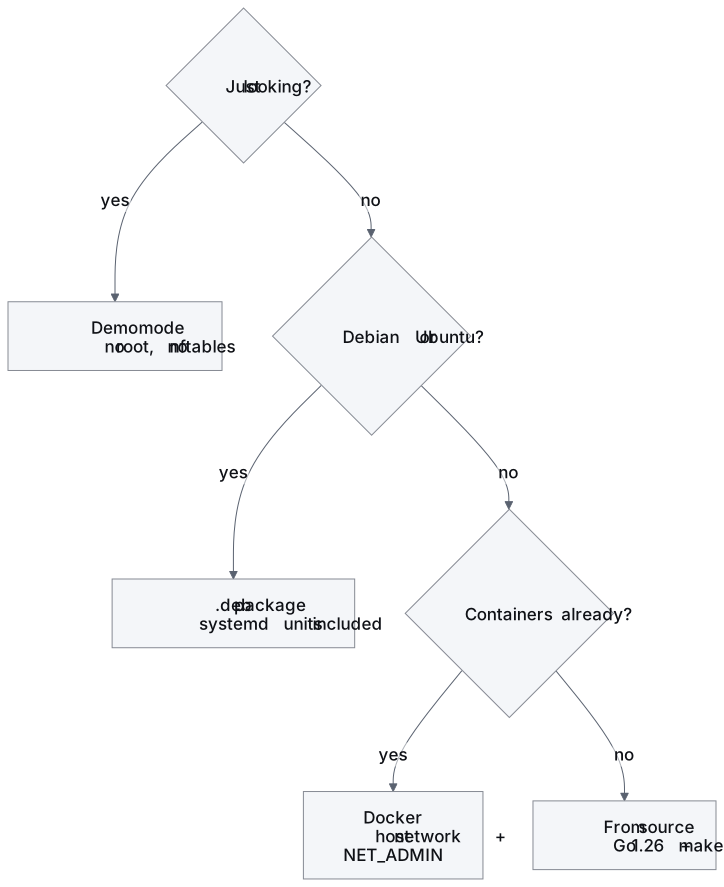
The host
| Minimum | ||
|---|---|---|
| Kernel | 3.13 | when the nftables netlink API arrived |
| nftables | any | apt install nftables |
| init | systemd — Debian package | for the service units |
| init | none — Docker | supervisord runs both processes inside the container |
| Architecture | amd64 or arm64 | binaries shipped for both |
| RAM | ~32 MB | both processes, idle |
| Disk | ~20 MB | binaries, assets, config |
| Privilege | CAP_NET_ADMIN |
the core needs it to write rules. The web process does not |
The packet log’s NFLOG group needs the nfnetlink_log kernel module.
Nothing here loads it by hand — the kernel autoloads it the first time a
process holding CAP_NET_ADMIN binds an NFLOG group, the same way it
autoloads nf_tables. Only a host with module loading disabled entirely
needs modprobe nfnetlink_log itself, and falls back to the kernel log
until it gets it.
Tested on
| Distribution | Architectures |
|---|---|
| Debian 12 · Debian 11 | amd64, arm64 |
| Ubuntu 24.04 LTS · 22.04 LTS | amd64, arm64 |
| Raspbian (Debian 12) | arm64 |
Other systemd distributions with nftables — Arch, Fedora, openSUSE — should work but are not in CI.
Ports
| Port | Direction | Purpose |
|---|---|---|
| 12227/tcp | inbound | the web interface, HTTPS only |
| 80/tcp | inbound | only when tls.acme = true — the HTTP-01 challenge a certificate authority uses to prove control of tls.hostname. Not opened by easywall’s own rules; see Security → Transport |
No other plaintext port. The two processes talk over a Unix socket, not a port.
Not required
- Python, Node.js, or any runtime beyond the two binaries
- A database
- A Go toolchain on the target — use the
.debor a release binary - Outbound internet access. Fonts, stylesheet and scripts are served by easywall itself, so it renders correctly on an air-gapped host. Two things reach out, and both fail quietly. The update check is on, and can be switched off. The installation count is off, until someone switches it on. Both are listed in full under Security
Coming from easywall v1
v1 used iptables and YAML; v2 uses nftables and JSON. The rule file cannot be imported — recreate the rules, or use export/import once v2 is running.
sudo systemctl disable --now easywall easywall-web   # stop v1
pip uninstall easywall                               # if installed via pip

# optional: v1's iptables rules are independent of nftables and can stay,
# but if you want them gone
sudo iptables -F && sudo iptables -X
sudo ip6tables -F && sudo ip6tables -X
Next: Debian / Ubuntu · Docker · From source · Demo mode · First run